
MercatIQ home

SOFTWARE COMPARISON WORKSPACE

SOFTWARE COMPARISON WORKSPACE

Compare software tools based on what your team actually needs

Compare software tools based on what your team actually needs

Compare software tools based on what your team actually needs

Start with a shortlist, a software category, or one tool you are considering. MercatIQ helps you compare options by criteria, weigh trade-offs, and see which software fits best.

Start with a shortlist, a software category, or one tool you are considering. MercatIQ helps you compare options by criteria, weigh trade-offs, and see which software fits best.

No generic rankings. No spreadsheet setup.

Compare software by your use case, budget, requirements, and priorities.

No generic rankings. No spreadsheet setup.

Compare software by your use case, budget, requirements, and priorities.

MercatIQ software comparison: use your shortlist, find alternatives, compare by criteria and score trade-offs, with options scored on pricing, integrations, features and ease of setup.

A software list helps you discover. MercatIQ helps you choose.

A software list helps you discover. MercatIQ helps you choose.

Review sites show options. MercatIQ helps you compare

them against your own needs and priorities.

Review sites show options. MercatIQ helps you compare them against your own needs and priorities.

Icon

Compare by your criteria

Features, budget, team needs, and constraints

Icon

Compare by your criteria

Features, budget, team needs, and constraints

Icon

Weight what matters most

Your priorities shape the comparison.

Icon

Weight what matters most

Your priorities shape the comparison.

Icon

See the best fit clearly

Know why one option fits better than another.

Icon

See the best fit clearly

Know why one option fits better than another.

Start from where you are

You do not need a finished brief. Start with what you already know.

Icon

Already have a shortlist?

Compare your tools side by side.

Icon

Already have a shortlist?

Compare your tools side by side.

Icon

Still searching?

Start with a category or use case.

Icon

Still searching?

Start with a category or use case.

Icon

Have one tool in mind?

Check it against real alternatives.

Icon

Have one tool in mind?

Check it against real alternatives.

Icon

Need team alignment?

Use shared criteria and scoring.

Icon

Need team alignment?

Use shared criteria and scoring.

How MercatIQ helps you compare software

How MercatIQ helps you compare software

How MercatIQ helps you compare software

STEP 1. DEFINE YOUR NEED

STEP 1. DEFINE YOUR NEED

STEP 1. DEFINE YOUR NEED

Tell us what you are looking for
Start with your use case, budget, must-have features, team priorities, or the tools you already have in mind.

Start with your use case, budget, must-have features, team priorities, or the tools you already have in mind.

MercatIQ input showing the request Best CRM for a growing B2B sales team, with options to search products and services or suppliers and to set the country.
Criteria weighting in MercatIQ under the heading What matters to you, with a slider setting the importance of each criterion.

STEP 2. SET CRITERIA AND PRIORITIES

STEP 2. SET CRITERIA AND PRIORITIES

STEP 2. SET CRITERIA AND PRIORITIES

Decide what matters, and how much

Decide what matters, and how much

Decide what matters, and how much

MercatIQ suggests criteria based on what you are buying. You edit them, add your own, and set how much weight each one carries, so the comparison follows your priorities and not a generic scoring model.

MercatIQ suggests criteria based on what you are buying. You edit them, add your own, and set how much weight each one carries, so the comparison follows your priorities and not a generic scoring model.

STEP 3. RESEARCH AND SCORE THE OPTIONS

STEP 3. RESEARCH AND SCORE THE OPTIONS

STEP 3. RESEARCH AND SCORE THE OPTIONS

MercatIQ researches the options

MercatIQ researches the options

MercatIQ researches the options

MercatIQ checks product pages, documentation, pricing, integrations, reviews, and support details for each tool, then scores every option against the criteria and weights you set.

MercatIQ checks product pages, documentation, pricing, integrations, reviews, and support details for each tool, then scores every option against the criteria and weights you set.

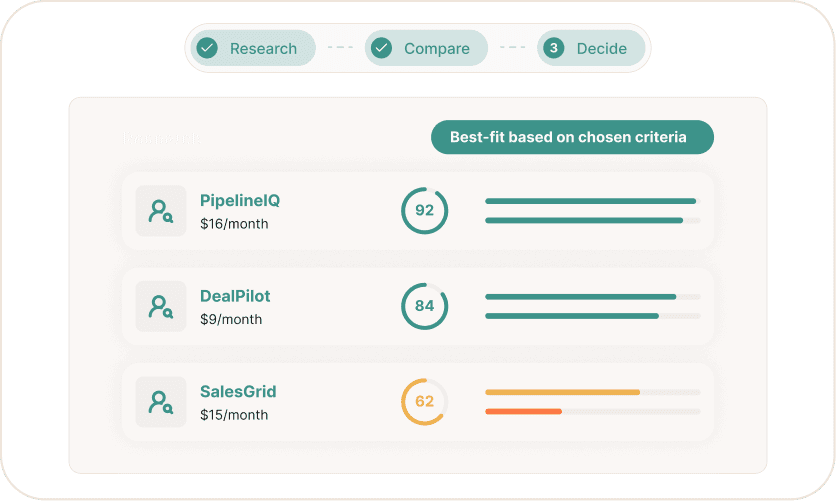
MercatIQ results ranking example CRM tools by best fit and monthly price, based on the chosen criteria.
MercatIQ recommendation card naming the best-fit CRM and explaining why it ranks ahead, noting it is not the cheapest but has no weak criteria.

STEP 4. REVIEW AND DECIDE

STEP 4. REVIEW AND DECIDE

STEP 4. REVIEW AND DECIDE

You see the strongest fit, and why

You see the strongest fit, and why

You see the strongest fit, and why

MercatIQ recommends the best fit and shows the reasoning behind it, including where an option is stronger, where it costs more, and how far ahead it is. Your team reviews the trade-offs and makes the call.

MercatIQ recommends the best fit and shows the reasoning behind it, including where an option is stronger, where it costs more, and how far ahead it is. Your team reviews the trade-offs and makes the call.

Stop comparing software in scattered tabs

Stop comparing software in scattered tabs

Book a demo and we will run MercatIQ live on a software decision your team has open now. Or send us what you are evaluating and we will tell you whether it fits.

No spreadsheet setup. No generic rankings. Just a clearer way to compare software.

No spreadsheet setup.

No generic rankings. Just a clearer way to compare software.

No spreadsheet setup. No generic rankings.

Just a clearer way to compare software.

Questions before you start

Questions before you start

The questions we hear most before a demo. If yours is not here, ask us.

Can I use MercatIQ if I already have a shortlist?

Yes. Add the tools you are considering and MercatIQ builds the comparison around them. It researches each one, scores it against the criteria you set, and shows where the differences actually matter for your team.

Can I start if I do not know which tools to compare yet?

Yes. Start with a category, a use case, or the problem you are trying to solve. MercatIQ researches the software options that match your context first, then turns them into a structured comparison you can work from.

Is this the same as a software review site?

No. Review sites rank software for a general audience, using reviews from teams whose situation may not match yours. MercatIQ compares software against your own use case, budget, requirements and priorities, and shows the evidence behind each score.

What can I compare software on?

Features, pricing, integrations, implementation effort, support, and workflow fit, plus anything else that matters to your decision. You choose the criteria and set how much weight each one carries, so the comparison follows your priorities instead of a generic scoring model.

Where does the information come from?

MercatIQ runs live research across product pages, documentation, pricing pages, integration listings, and review signals, and keeps the sources attached to the result. Every score can be traced back to the evidence behind it, so your team can check the reasoning instead of taking it on trust.

What happens on the demo?

We look at a software decision your team is working on now. You see how MercatIQ researches the options, structures the criteria, and builds the comparison, on your decision, not a canned example. If it fits, we set up your workspace after the call.